Hey guys,
Today I’m going to be talking about 3D data visualizations using Three.js, React, data feeds from the USGS and progressive web applications. I think progressive web applications are a huge thing potentially for businesses that want to have a high return on an initial investment because you can deploy it to the web and also playstores. I’m going to show you that right now actually.
(clicks on another window)
So, firstly let’s check out the data feed. Here it is. This is the USGS (United States Geological Service).
(moves cursor to the bottom right column, clicks through to data)
They have data feeds on the side here…we click through, this is the maximum, all the earthquakes in the past 30 days. You can see how long that took. It’s a massive amount of data actually that comes through the scroll bar, so…so small there.
(power scrolls)
You can even see that in scrolling on my screen, if I scroll fast enough down, I don’t know, it kind of janks up sometimes.
(switches back to prior screen)
The interesting thing about this was, in doing this I actually noticed a bug in the USGS’s API, when the 30 Days, All Earthquakes count grew to be too great, I believe it was when it was over 15,000 or 20,000, something like that. When the data set was too long it actually would just error out. The whole API for that went down. I had to contact the USGS myself and have them fix that. So they just raised the limit for my request. So if you end up using these API’s and you specifically need the All Earthquakes, for the 30 Days, and it gets really high one month…you’re welcome. Haha! Thanks, also to the USGS for providing these fantastic data sets and fixing that.
(clicks on another window)
Let’s jump over to the Google playstore. As you can see, this is a progressive web app. Which means that I’ve gone and built it on a website. Right, it’s web-code, it’s HTML, CSS, Javascript, Frameworks, of course, React, Three.js. But the cool thing about this is you can build it in one language and deploy it across multiple platforms. Very great for business return on investment, fantastic for MVPing. Very great for early-stage startups and testing things out, because you only really need one set of developers. Good luck finding someone who knows how to write Native, Objective C, and Java, and Javascript. It gets a little intense having to manage all these people. So it’s a great way to start out.
(switches back to app)
So, let’s jump over to the app. I want to talk about some of the technical implementations I’ve put in here, that were essentially non-standard, I wasn’t expecting. So, this is built with Three.js. The data sets are so large that if you put this on the client-side, like on a phone for example it’s going to crash the browser in the phone. It’s just going to take it down. It doesn’t matter if you are on an old phone, a new phone, an iphone…it doesn’t matter. It’s just too much data, it’s difficult to do. So in doing the UI, I really wanted to keep it simple, I didn’t want to put in React components, I wanted simple HTML, and that’s what we got here, because the actual visualization and the data is so intense that I wanted to keep everything else really simple.
I put in a custom API for estimating download times. I take that GeoJSON set in the back end, I run some cron jobs and I convert it into Three.js, JSON on the server-side, which is not very often done. So, I’m one of the few people who have done that because I had to go through a bunch of…I had to surmount many problems in doing that because It’s not a typical use case. But we’ve gone and done that here, and it’s a fantastic experience.
So let’s check out the 30 days and jump in here. I built this project originally because I had met, now a good friend of mine in Thailand, from Nepal. His name was Mukti. There was a huge Nepali earthquake at the time. He brought people in from his village and housed them. Quite a lot of people in fact. I was so inspired that I really wanted to build this.
This is the application here.
(moves cursor over the left side bar, scrolls)
So, we have on the left side bar, all the earthquakes for the past month. There’s the location search. There’s list virtualization here. If you had that many in the list it would jank up, it would be a terrible experience. But what it does is it only render this 15 or 20 out of the entire set, dynamically and removes them when they are out of view. Which is great.
(selects physical globe from right sidebar)
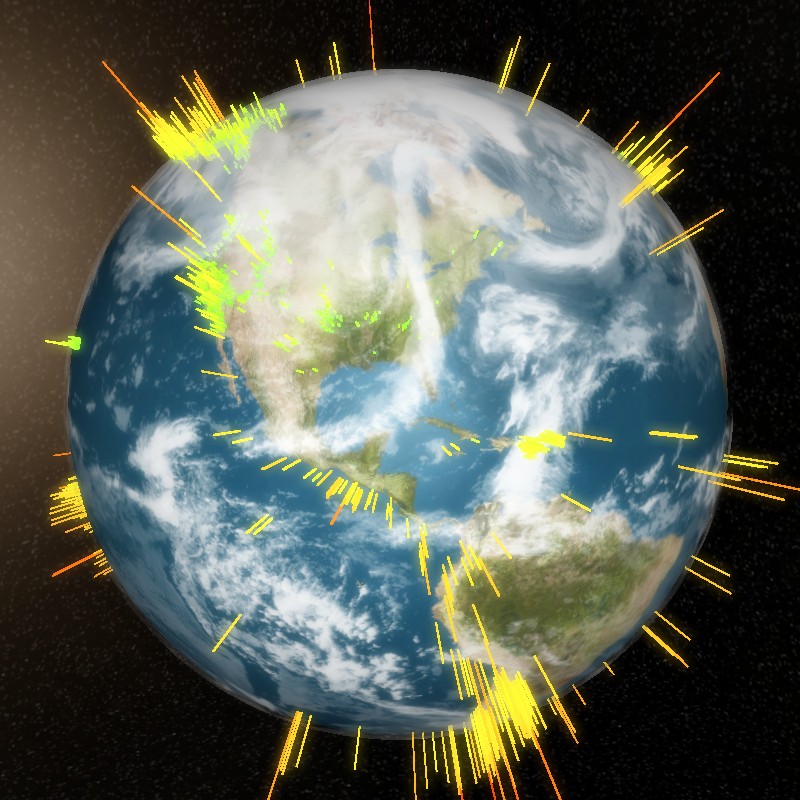
So let’s check out some of the different textures I have here. I have a physical globe. That removes the cloud layer. I got these images from NASA and compressed them a bit.
(selects Political Globe from right sidebar)
If I go into the political globe it switches over, and you have a very bright white outline of the borders, and you can really see the coloring. The way the coloring demonstrates visually the intensity of the earthquake is if it is green and small, it is a short earthquake. If it’s a long, lengthy point, like this one over here, Woooh! That’s a big one.
(selects Tectonic Globe)
Alright, let’s check out the tectonic globe, which is a really cool globe texture I made in Photoshop, and then mapped to this 3D sphere. It’s great for education to show people that a lot of these earthquakes happen right along the tectonic plates. Super cool, great visualization I think.
(selects Physical Globe, clicks on Auto-rotation)
So let’s bump it back to the physical globe. You can see there is auto-rotation. Very calm auto-rotation, you can pop it on and off.
(hovers cursor over data sets on right sidebar)
And then there are the different data sets here. So once you download the 30-day data set, you get access to all the smaller data sets. If you just downloaded in the past hour, these are essentially grayed out and inaccessible.
This entire UI works on a phone, so the way it works is these selections are on the bottom, you are able to click and this will drop down from the top. It will replace the entire view, you click on this and then it will hide it and it will rotate to the location. You can zoom in and pan on the phone as well. I’m just doing the desktop because the video would be too long if I did it otherwise. Feel free to check it out. Specifically tested this in Chrome in an Android browser. There were some issues on Mac and Safari with the texture loader, I may have gone and fixed that, but I primarily develop on Windows or Linux.
(selects Past Hour on right sidebar, then Past 24, finally Past Week)
So let’s check this out. In the past hour only eight. So small, these earthquakes. In the past 24 hours, 280. Pat week, almost 2,500. Very cool stuff here, guys.
(Chooses 30 Days, then enters California in the search field)
Let’s check out the 30 Days, and let’s test out the search functionality. So if we type in California here, and do the search, it pops over, and this overlay comes out of nowhere on the left, and replaces it. Now let’s click on this.
(chooses specific location from the list)
So BOOM, you have zooming and panning to the location. You have this small sphere.
(switches to the Political Globe)
Let’s go over to the political globe, you can see it a little better. You see that there? You can. In the larger earthquakes, it’s a larger sphere. But it was a fun project that I enjoyed doing. There was some learning involved with mapping coordinates to a 3D globe, so I actually learned about Cartesian systems, and coordinate systems and maps in general. It was a great experience.
So if your business is needing some Three.js and React work, or just a progressive web app where you can deploy this into a play store or a Google app store for a relatively lower amount of initial investment than hiring a separate code team for four different platforms. I hope this video helps demonstrate the value in that. If you want to talk more about this, about how this type of approach can benefit your business, please contact me. I really look forward to talking about how we can generate more revenue and better experiences for your customers.
Thank you and have a good one. Bye.