Categories
Client Projects

Peak HVAC

Hey Everyone, 

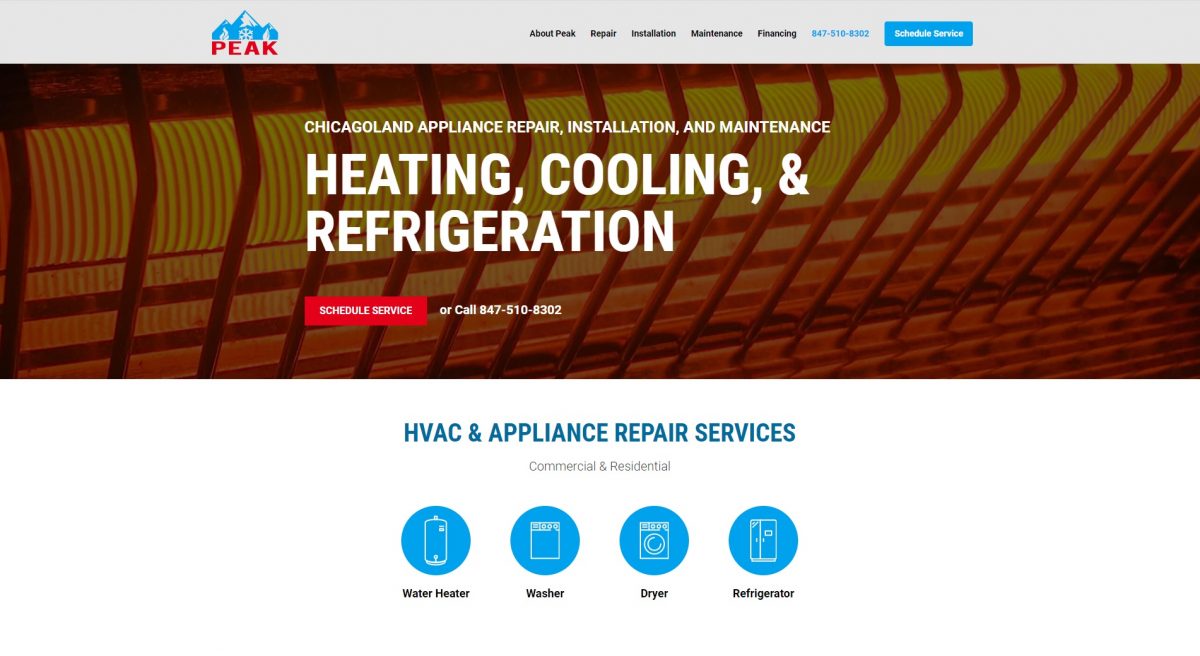
Today I’m going to be showing a custom WordPress built website for Peak HVAC in Chicago. This is a fully customizable CMS website we built that is just basically from scratch, it’s just custom. I’m going to jump in and just quickly go through the website and then I will go through the CMS and show you how everything can be changed. 

I just want to point out that if you have a lot of content, CMS’s are fantastic for that especially if it’s static content. So it’s not very interactive as far as the data doesn’t change very much. It’s not a web app, you can have 50 pages and 5 templates and 10 pages per template, and it keeps crossed down and at scale, it works really well. The wanted a CMS website and that’s what they’ve gotten. 

Let’s just jump into it. 

(clicks on Water Heater)

This is the home page. We have some pop-ups here. 

(starts clicking randomly on buttons)

This is all customizable content. I think it’s pretty cool that you can see what brands this company offers and it does change based on the choice. I haven’t heard of some of these like Reem and Goodman, but they are probably great brands.

(scrolls to the bottom of page)

So if we keep scrolling down. You can see, this is the homepage. There’s a nice little review slider here and you can click and push though and the height also adjusts dynamically there. 

(clicks on the About page)

If we go to the about page. You can see there is a lot of content that gets reused. Which is pretty standard for websites like this. 

(clicks over to Contact form)

There’s a contact form. What service do you need? What do you need serviced. Your message and what brand they want. 

(demonstrates scrolling)

You also have a bit of scrolling there so you can see that this scrolls when you click on that. It’s really for mobile but we leave it on there regardless. 

(stops on Financing)

They also do financing through a company called FTL Finance. So you click on this and there is a tracking link which they get a referral commission, of course. 

It goes through that and then there’s a scheduled service. You know, there’s a lot of form for contact and that’s so no one gets confused and they can just real easily get it out there. 

(adjusts screen for mobile)

So cool, let’s check out the mobile site here. If I jump over and go here and refresh. So this is like an Iphone 7 here. 

(starts to scroll)

Now watch as I scroll down. As soon as I get past, you’ll notice…you see that service button, as soon as that gets hidden, BAM we have a footer pop-up, call to action, you actually can just press the phone number and it will call it on your phone, or you can press the scheduled service. 

(clicks on Water Heater)

The modal pop-ups naturally are full width right there and there’s a mobile menu. It’s pretty nice. I really like the look of this mobile menu. We go down and you can see that things are basically stacking and collapsing and then here’s the bottom with the footer. So this is basically the flow for the mobile look here. You can just see how it collapses.

(modifies browser address for admin panel)

 Let’s just jump over to the Admin panel so we can check that out, just so I can just show you very quickly the advantages of…

(fumbling over password)

Ahh password! I have so many passwords, it needs to use a retina scan or something. 

(navigates through left sidebar menu to About)

So if we go to Pages, and we go to All Pages, then you can see in the About, for example, if we go to the about page it will be completely editable and these are like blocks essentially is what they are called in WordPress. So we code these blocks up and create custom fields which are these things, and then it’s totally customizable so you can see that you can just put in your title, you can put in the background color, the text color, the image….

(switches to Home page)

Let’s go over to the Homepage actually and let’s just see that. 

(shows background images for slider)

So yeah, this one here, for example, you can that these background images are for the slider. When it slides through if you just put one, it won’t do the sliding. Then you have the phone and all the extra texts there. 

(clicks to another screen)

These ones you can see you have your image and then these are the logos on the pop-up and it takes these pop-up texts, you can see it’s labeled very simply here. Overall the whole website is built like that. Which is really great for customization and so many things.

(switches over to Contact form)

Let’s check out the Contact form. We have Contact form 7. It’s a plugin. I recommend that one for WordPress it’s pretty easy to do. 

(scrolls inside window)

Then here’s the text and the options in here, which is kind of like HTML and then they have these little shortcodes and these brackets that are actually plugin related. 

(clicks on mail tab)

Then if we go to the mail, here’s the template that you would receive and where it goes. Right here, and you use no-reply at this website because if you use say like, Yahoo.com they don’t allow that so actually it wouldn’t get sent. Different email companies have different privacy and security concerns with that. So I know Yahoo and AOL won’t work so that’s why you use No-reply. 

(goes back to Home page)

Anyways though, I hope you guys enjoyed the site and this could be your website, this could be your company and offering this could help grow your business. It can help increase your SEO. You can get alot of content onto just a few template pages and really have a lot of control over that thought a CMS. 

So yeah, if you need some custom WordPress development from scratch, I always enjoy doing it from the bare-bones in the beginning, because if you do use a template, there are times to use a template, is all I’m saying and there can be a lot of overhead when you use a template, because they just throw everything and I guess the kitchen sink into it or I guess in this case, an appliance. It just loads a long long time. This is a pretty fast load because it’s just everything you need, and that’s it. So if you have the budget, I do recommend just building it custom from scratch. 

So let me know. Reach out to us, and thank you for watching.
Categories
Client Projects

Enye

Hey Guys,

Today I’m going to be demoing a template-based WordPress site here. So let’s check it out. 

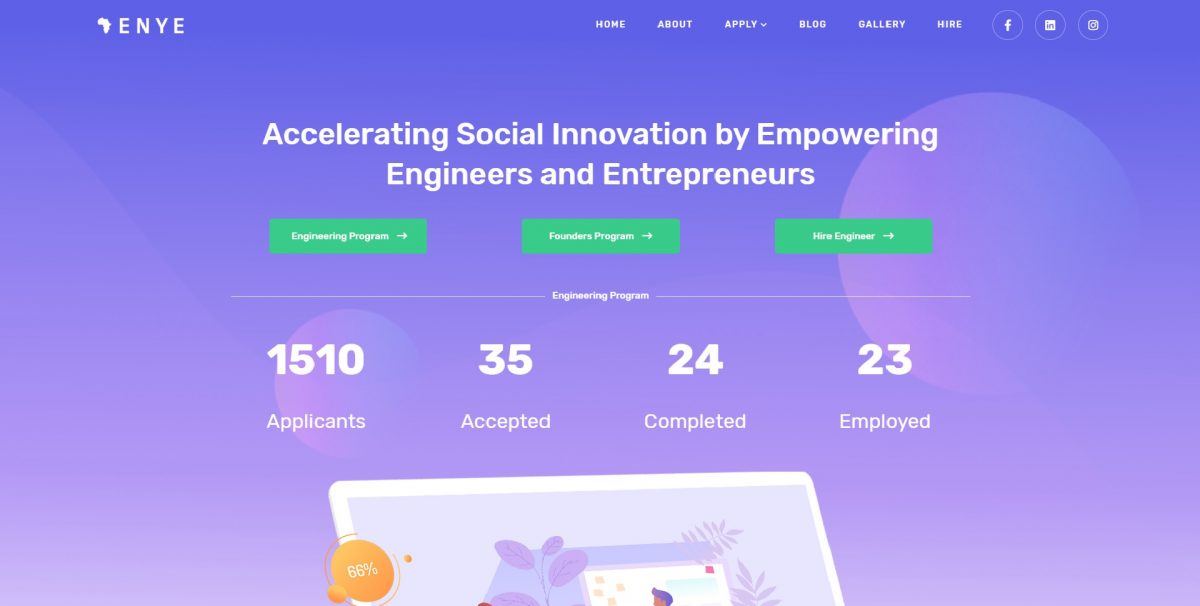
(refreshes page, numbers roll and eventually stop, highlights Engineering and Founders programs)

This is a 501C3 nonprofit. It’s an international tech charity. They have two main aspects here. It’s the Engineering program and the Founders program. 

(scrolls down to the bottom of page, shows it is an 8-week course)

So what they do is they train engineers in Africa, specifically Nigeria during an eight-week course, and during that eight-week course. They learn a bunch of skills related to programming, deliver a bunch of features in an entrepreneur’s web application. So essentially it pairs them together and then by the end of it there should be an MVP app. 

(goes towards the bottom of page, highlights interactivity and animations)

As you can see there is a lot of pre-built interactivity that comes up, a lot of animations and templates are a really great value for a business owner or someone who wants to get an 80% done website and just load in some content. 

(scrolling up and down, comes upon a picture of self)

There’s a lot that you can do with it, they are pre-built out. The one downside is they can be kind of heavy as far as load times because there is so much included in them, but if we check out this site a bit more, we can see surprise surprise! I actually helped start this charity, but I just want to go through and show some pages and things like that. Let’s check it out. 

(screen changes to page with cards and photos of team members)

So I have these cards that are in here and then you have these hover-links that you can go through. This card style is something that is throughout the template. These are essentially components, WordPress components, and you can see that throughout.

(selects Partners, continues explaining as he pages around)

Let’s find another one, Say Partners for example. You can see that it’s a good look I think. I think it works. But I just wanted to demo this guys, because there is a lot of potential for business owners here to be successful using just a template-based website. It allows for a lower budget overall. I think it’s good to start with the templates a lot of the time and then go from there because building out from scratch takes so long unless you have a really custom build on the foundation, it makes sense to use a template as a base and just change things up, optimize it, things like that. 

(hovers over web address)

So just check it out. If you want to see this website it’s enye.tech. Also if you want to hire any of these remote engineers, they have very good rates, naturally, being in Nigeria. So if you are into international workforces, kind of like, off-shore international. This may be a good option if you are able to provide oversight and management and allow them to grow on your team. 

(brings back to the main page)

So cool! Alright, guys that’s pretty much it and all I have to say is check out some template-based websites because they are a fantastic value for the dollar amount. For anyone starting a business, that is needed. Just hire a web developer, get a template in, get them to do some customizations. 

And what is Chris saying? Ahh, I don’t know but I think we were having a funny conversation about something. Close that out. Alright guys, have a good one. Bye.

Categories
Client Projects

Zaam

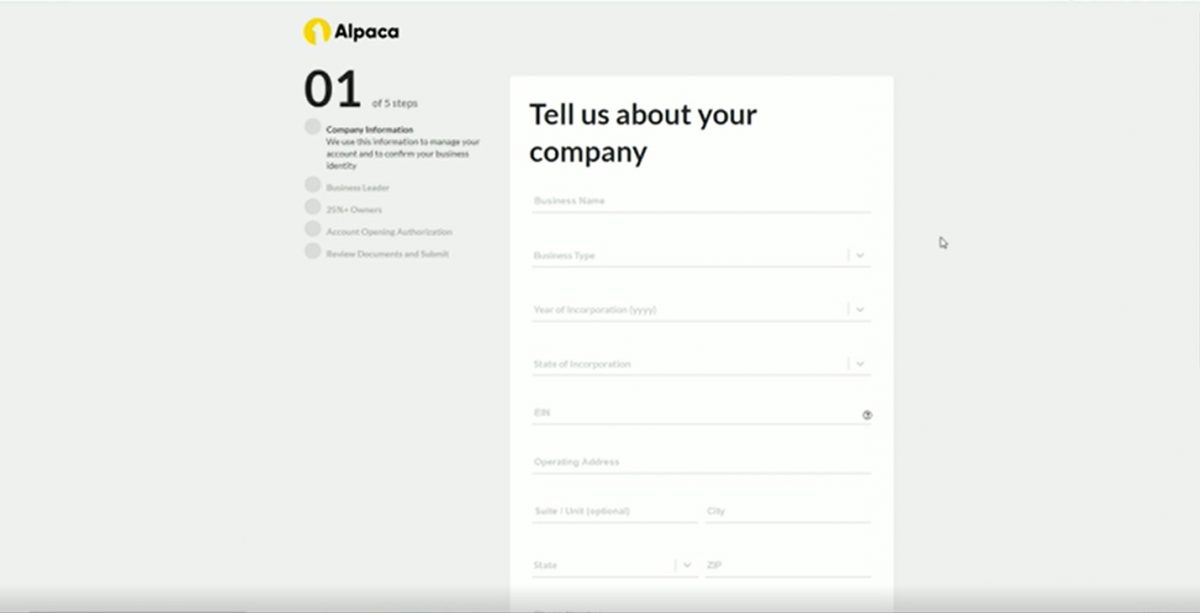
This was a project I did for a  company called Zaam, as a freelance contractor with my business. Zaam does business onboarding forms. They are a SaSS company. Fantastic product if you are a large company or if you have a lot of regulation for your clients, a lot of forms, automatic PDF’s filling out agreements use Zaam, Zaam.io, fantastic. 

So this was the main product that I helped build for one of their clients. 

(clicks on yes)

This is a pre-filter that puts you on a list or allows you onto the next form. If I click “no”, I’ll basically get blocked and I cannot continue, but let’s say yes. 

So, here we are, this is the main step forms here. 

(tries to click ahead)

I cannot click ahead. I have to do it sequentially. We thought that made the most sense. 

(clicks on the plug-in to the top right, starts to click on fields to reveal roll down menus)

I also have a handy plug-in here, that allows the browser to fill in fields with dummy data. On some forms that I built for this company, we have live SSN checking and what-not, a sync validation in it, but this is just synchronous validation for this. So you can see that we continue. 

This is still in development, but it’s more or less there.

(hovers over circles to the left)

 So on production these circles are the right size and things are more or less good, so you can see that now that we have the second form. 

(clicks on first circle)

If we want to go back, we can go back. 

(tries to change something)

If I change something, and I try to continue…oooh, that’s actually optional. You can see that we cannot continue. That was funny there, guys. 

(resets page)

So let’s continue, that basically re-saves it. I’ll show you here after I upload some more things. 

(chooses from citizenship field)

Citizenship, let’s say it’s not American, there’s some logic, 

(fills in number for passport)

has to be a National I.D., passport number, and you have to upload your passport.  

(scrolls down to photo upload area)

Let’s upload some cute dog photos, bam! 

(continues scrolling through the fields)

They’re uploaded, they go to the server, there’s an EUID, there’s an S3 bucket that host’s them, but let’s say that the country they actually reside in is different. So U.S. country?  They

Dropdown. Non-U.S. country? Date or Province textbox. Makes sense, right? 

(hits continue)

So I could continue on that. There is some logic for these, right? Let’s click on through all that. 

(starts filling in answers. Clicks other owners)

Are there other owners? You can add these dynamically. One, two, got it? 

(fills out one field)

But for the sake of time, let’s just do one. 

(quickly selects options in fields)

Let outright quick, let’s say they are Albanian, and we need a different photo. Let’s use Patch pup. He’s a great one. And the country, let’s say they are actually in the U.S. now. A little logic on the continue. We save that and let’s fill this out. And of course, these have to match, so Lucy Rosalles, alright. All this data goes to a CRM that Zaam has built for the client. This is essentially a pre-submit that stays in the date base, 

(clicks on authorization)

and you have your typical authorization. Click-throughs, if you click this link it goes to a pdf generated by the back end. I didn’t build that, so I’m not going to demo it.

(clicks submit)

You have a final submit. Submit application. Bam! There you go! Right? The cool thing about this is if I go back…

(pop-up window opens with something about motorcycles)

oops! I ride motorcycles. Let’s load that out. 

(goes back to data just entered)

Okay, you can see that you can go back to all this data and it has been saved. You can see these images, see these owners, it’s all there. So really great software, like I said it’s still in development, so we’re still putting in more logic and integrating this to be more complete, but for demonstration purposes and an example of what my business can offer your company, I think this stands to be a very good example. So I hope you enjoyed it, and take care. 

Categories
Client Projects

Holy Kitchen

Hey Guys,

Today I’m going to be demoing this screencap of a custom PHP website with an admin panel for a restaurant called Holy Kitchen. Most people think it is an Indian restaurant, but the owner is actually Nepali. It’s in my local neighborhood. They’ve changed their name to Bon Apeteka, because I believe they are trying to be a little bit more secular in this day and age, but the food is still traditional and fantastic.

(background video starts)

So let’s check out the website right here.

(starts scrolling down)

So, I started with their logo. I got this great copyright-free video for the background. As you scroll down you just have the menu there, that you can add to the cart. You have a nice little full-width banner there. Just some Indian/Hindu flare.

(highlights menu items)

If you add to the cart, it will pop up on the right there. You can keep adding, and of course, the math is done. You go through the different sections on the left.

This is all mobile responsive as well.

(starts adding and subtracting menu items from the cart)

In this screencap, I don’t have it recorded for that, but if you can just imagine the menu going above and just everything stacking more or less. So as you can see, when you empty out the cart it just vanishes there.

(switches back to the main page)

On the top left, you click through to the logo, and it goes to the admin panel for the restaurant owner. You log in and it’s pretty straight forward here.

(starts scrolling down)

So we have all the corresponding categories for the items that they sell, and you simply edit/remove, and then if you want to add you just click on the plus.

(clicks on the plus, a window pops up)

So I think the icons are really straight forward there. The overall UI here is pretty simple. You know it’s a back end here, so on this one, we don’t have to be super aesthetic about it. This didn’t use a component framework. It’s pretty much just raw HTML, CSS, and PHP. Sometimes we just like to keep it really simple and light when there are not too many pages on a website.

(moves cursor to the right)

So if you want to log out, you just got to the right there.

(clicks on log out)

Hit Log Out, and then you’re back to the admin panel. Let’s just finish up on the video here and close this video out. Thanks for watching. If you guys need a custom PHP website or an admin panel for a restaurant like this. Feel free, we can build that for you. Just drop us a line anytime.

Thank you.

Categories
Client Projects Featured

Squirrel Hill

Hey guys,

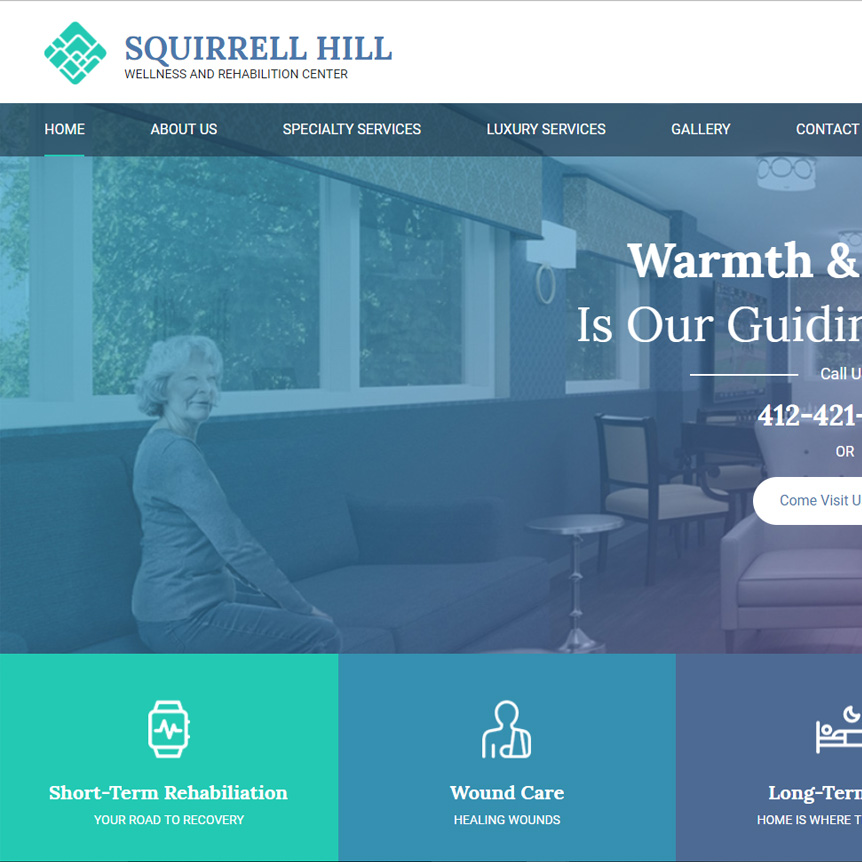
In today’s video, I’m going to go over the Squirrel Hill project here.

This was a website build-out with Bootstrap, HTML, CSS, and PHP.

(moves cursor to the header, footer, and the Contact Us area of the page)

The PHP came in handy here for creating templates for the header and the footer, as well as this Contact Us, and you’ll see in a moment all the action that looks similar to this but is slightly different.

(starts to use arrows to move slide show, clicks on About Us, shows the header template)

So let’s just check out a little bit of the functionality here. This was based on Photoshop placeholder images, and if we go through to a couple of different pages, and see that there is also this type of header template on these pages…and so, that is one of the things that you have to take into account in designs, right?

So if you go and hire a designer, here’s the component I was talking about. If you go and hire a designer, okay…and there’s not a lot of reusable components or templates rather in your websites or your web application, it may behoove you to just sit down and think about, you know, is there functionality that can be kind of joined and then reproduced? Because it will make the budget a lot more affordable in many ways because they can just reuse these templates instead of having to create a custom page every single time. Right?

(scrolling up and down, highlights subcategories)

So yeah, this was essentially just a bit of a PHP buildout. If they wanted this customizable we would throw this into WordPress. A lot of these things are WordPress pages essentially, right, you have your WordPress custom menu and you have your pages right here and these would end up in their own categories, and there would be Contact Form 7, perhaps here for the email subscription. But then let’s check out a few more pages here.

(highlights the watermark)

Yeah, you can see a bit of the watermark, right, because this was a sub-contract here, so they wanted me to actually build this in an incredibly quick amount of time. Actually, the deliverable for this was one day. That was a rush job. So, I really don’t like doing that because I have a certain amount of quality that I really enjoy delivering, and to deliver that in such a short amount of time actually stresses me out.

(clicks on Gallery, clicks on random pictures in Gallery)

So, if we check on some of these things here, in that rush delivery there is no scrolling through these, sliding though, there’s just an X. So that’s some of the nuances you would miss when you have to build something as fast as possible.

(back to home, switches to mobile responsive size window)

Overall, for the deadline and for the quality here, I think I did a really good job. All things considered because it is also mobile responsive. Right? So if we put this down here, you can see, stacks up, right?

(highlights large print navigation for elderly)

We have this, and I made sure this was really big, because people in their elder years really have a hard time navigating websites, and not everyone has a younger person or a guardian to do this for them, so there are some older folks that have to figure this out for themselves.

(hovers the cursor over features as he explains why he likes the website)

So this is the website right, and there’s your mobile responsiveness. Overall, it was pretty fun, aside from the really rushed deadline. It was cool to just do a PHP website that wasn’t a WordPress website, and I really enjoyed the design aesthetic that the designer had built out here because I tend to like cool colors, and that’s exactly what this palate is, and has this great gradient they put on just to match these square boxes. I like how they have broken these down. I believe I have actually absolutely positioned these. This isn’t one giant photo, and the other thing in this project that took a little bit of time was I had to open up these Photoshop files and actually export all the assets, and then you have to do that in three different versions, right, because of file sizes.

You have your large, high-quality desktop version, and then you have your small mobile phone version. So that would have sped up delivery if I didn’t have to actually do a bit of designer type of exporting on that. But overall, I think this is a good example of a fairly solid web buildout here, effective, budget-friendly, and a good delivery.

So if you need any custom websites built out, this is not a WordPress one, but if you need a WordPress website, or even a fairly complex non-CMS website, custom work, we can do basic work.

In general, we don’t really like working with templates too much, unless it’s a WordPress template, because that just saves a lot of time. I don’t really like working with them. Some folks have HTML templates or websites, and I’m not talking component frameworks here, I’m just talking like an actual HTML template for a website. You get a lot of bloat on that. It’s like unless you stick really close to it, you have to clean it up and I just recommend a clean initial build.

So yeah, feel free to get at me, to contact me via my website or my Facebook page, and let’s talk about how we can take your business to the next level. Alright, thanks everybody. Bye.

Categories
Client Projects Featured

Radiesse Ads

Hey Everyone,

Today I’m going to be talking about how I as a programmer made the world’s hands a little bit more beautiful, in working with a company called Radiesse. They do dermal fillers, specifically for lower face and hands. I think it’s pretty obvious that most people when they get older, aside from their face, their neck, and their hands end up getting pretty aged.

A lot of people don’t think about putting sunscreen on the top of their hands, but you might want to do that, or else you might be getting some of this action.

(switches to images of banner ads)

The build-out for Radiesse was a set of banner ads. So these are HTML5 banner ads. Images edited in Photoshop put together. This slideshow, going through. You can click on it. There’s a link. Then you have the fine print, the drug safety of these dermal fillers, very important for compliance. You actually cannot be doing these things without that.

So with this, the specs were, it cannot be over 150 kilobytes, because advertising platforms won’t allow you to submit your banner ads if they are that large.

(scrolling up and down)

So, it was a really great experience in doing that. I had actually not done the scrolling aspect in an advertisement before this, but now that I have it was really great to do that.

(scrolls within the banner ad)

This was the first set of ads. They actually asked for a second set, which was different images and some updated text, because in this there are specific numbers for the drug product itself. You’d have to go through it all, but we might have actually added that in the second version there. I think we did.

It was a great experience working with them. I think this type of banner ad can be very useful for generating revenue for someone’s business, and it’s very important that you have a knowledgeable expert that can deliver quality results. Otherwise, you are just wasting your time, in my opinion. So if you or you know someone who needs these done, we can come on and deliver that and a fantastic experience for you. Looking forward to hearing from you.

Thanks, Bye!

Categories
Client Projects

Moojis

Hi Guys,

Today I’m going to talk about Landing Pages. This is an example of one I built here. I think it’s very fitting because a lot of times people invest a lot of resources into building a very fleshed out website when a lot of times a simple landing page can offer the business just as much value.

For myself, I know that with my past business really just having a simple website was just as effective as having a very complex one. Granted it depends on your specific situation, but this for example is a really good one, because here the main product that is built it really an application.

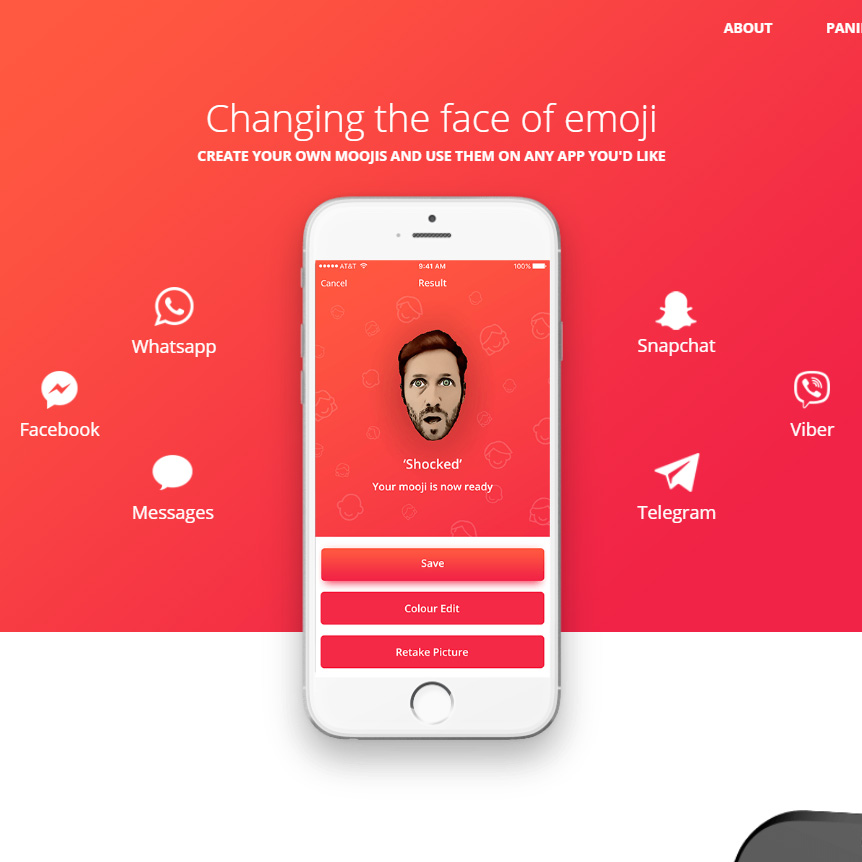
What it is is um this mobile application that is in the play store/app store. Of course, all you do is take a photo of yourself and then you are able to pick some pre-illustrated images to go over on top of it. This essentially uses its own algorithm to convert you into an illustration.

I tested this out. It wasn’t 100% perfect. You had to take a photo of yourself a couple of times to have it work perfectly, but if you are a bit patient, it’s pretty cool. Once you have it, it’s saved and you can send it out to everyone.

(scrolls up and down page)

This was Mooji’s. It was the #1 in the play store in Tel Aviv. This is Schlomi Ben here, and he’s a good guy. Pretty simple, the requirements for this just went through some illustrations, screenshots rater, of the actual application, you have your integrations here that it can be used in, and there’s just a little blurb about it. Links, download links, yadda yadda.

(clicks on Legal Notice)

Then a legal notice, you need that because you need a link actually to put it in these play stores for your privacy policy. That has to be available or else you’ll get denied.

You can see, Bam! Panimood, Israel.

(back to main screen)

So, yeah it was pretty cool to learn it was #1 in the play store in Tel Aviv. That was a bit noteworthy. So for everyone looking to build apps, this was arguably a successful one. I think the main build-out was just this animation and then making it responsive.

Really there are only a few certain, screen sizes you need to make this perfectly responsive.

(switches to another screen size)

So if we go through this here, there you are.

(makes window smaller, then larger)

Very rarely are you going to be going through the entirety of different sizes here. There are certain presets essentially. So that checked all the boxes for the specific requirements. Shlomi checked it out and he was happy with it.

Of course, I could make it responsive all the way. It’s just like, for the budget, that’s what was able to be delivered there. It’s good to keep your expenditures small when your main expense is actually the product and this is really just a marketing budget, but important none-the-less.

Specifically, with landing pages, there are some good things for marketing, specifically A/B testing, so you have one design and a second design and then it will just randomly, but equal distribution show different types of the design -the A or the B version to visitors on the web application or the landing page rather. And you’ll be able to get statistics about conversions and such and that’s why landing pages specifically are pretty worthwhile, if you take the time to get some market analytics on it.

So pretty simple here. I just wanted to do a little demo and talk about landing pages specifically. I hope that’s helpful just potentially giving you some ideas about what you can do with your own business. Thanks for stopping by.

Categories
Our Freeware

Precious Metals RSVP

Hey guys,

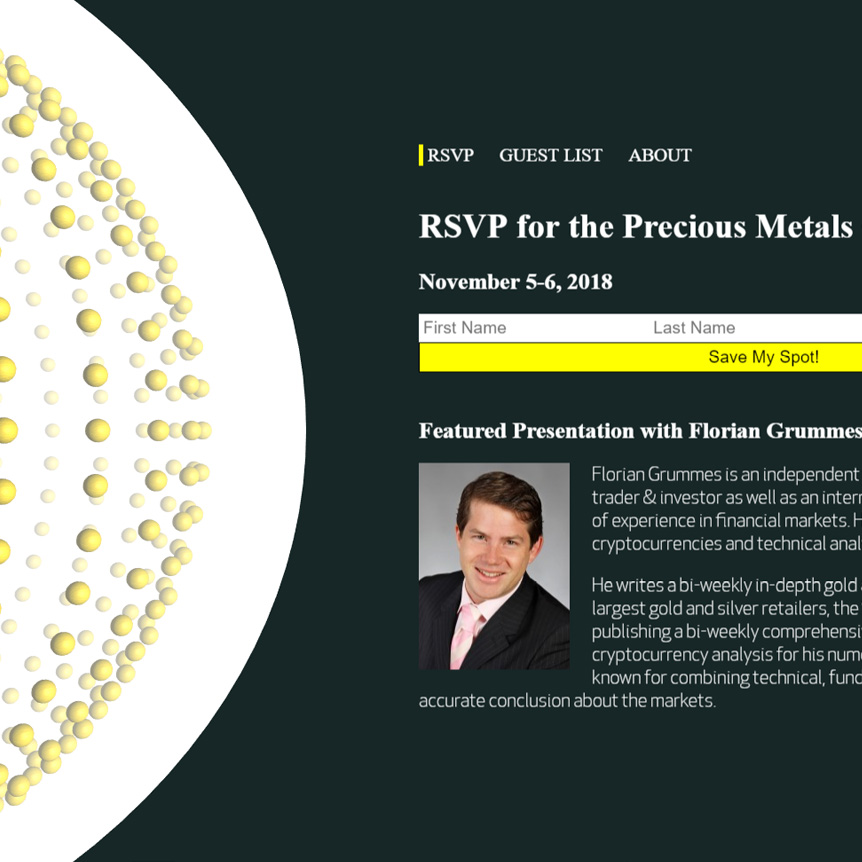
Today I wanted to show a bit of freeware I’m going to release. Upload this into a code repo and put the link into the description of the video. This was one of the final projects at the Academy of Art when I was there in 2018.

It gave me the opportunity to play around with Three.js, and some PHP. The requirement was to have a PHP database. So you’ll see as I go through here,

(starts animation)

I’ll just play this really quickly, that there’s a populated table with some fake data here that is off an API.

(flipping through the features)

The UI could be improved for sure. If I put in a bit of component framework, it would be a lot nicer, but this was just a bit of a more back end specific PHP project here. You know, form submission and updating and whatnot, but I really made this out because I wanted to do the Three.js on the side here.

(points to the graphic on the left side of the screen)

What I’ve done on the side is, this is sphere geometry and these are all vertices, and I just took the geometry, and I created spheres for every index in that array, and I just map over this array of vertices, and I place a new sphere at the location of that old vertex.

So in that you can do some really cool effects where you create a larger shape from some smaller shapes, and that’s actually a design principle. If you look here, we have three spheres here, going. We have the largest sphere, we have the smaller spheres, and then we have the actual background sphere. When it comes to design, repeating shapes is a bit of a design principle there, but I thought it was cool because you have 3D depth, and then you have 2D right here. That’s pretty sweet.

(moves cursor back to the information at the right, highlights the different features)

Anyway, the functionality is when you sign up and you do that form, you are able to go to this About page, and then this bottom part shows up, which is an iframe and then, thank you for registering and then they tell you when it’s at.

So yeah, going to release this. It was just a little bit of a project at University, I did way back in the day. So I want to allow people to play around with the Three.js parts, and then you’ll have to look into the PHP, because it was tied to a database, so likely those users are not going to exist, but there’s going to be an API call where you are going to be able to hit that and then populate that database. I think I even made a UI where you are going to be able to click a button and then you will be able to see it getting populated.

So just go through the PHP files and check out the repo a little bit, and it’s just a good starting off point so you don’t have to do a bunch of work to create a bit of a landing page thing, with 3D elements, database functionality and PHP.

So cool guys, check that out. Alright. Bye now.

Categories
Our Freeware

Space Sound Continuum

Hey Guys,

Today I want to demo the second product that I ever made in Three.js.

This was a more in-depth project that was just about learning and just having some fun. This was way back in the day. I learned a lot about shaders. I call it the Space-Sound Continuum.

What  I have is a few songs, and I have Javascript using the web-audio API to analyze frequency. Let’s see if I can jump over really quickly for this code… if it will open the right folder here, yeah…

(highlights directory on left)

So this is the directory for the game and we have a lot of shaders here on the side, a stereo effect for virtual reality. It creates a left frame and a right frame and then using the two it creates depth in kind of an illusionary perception.

(chooses script from the directory)

So let’s see here for the script and look really quickly at this. I have five different frequency counts and they are averaged out and interpolated in real-time. That was pretty cool at the time.

(chooses skyboxes)

And then about skyboxes, I don’t know if you know about them very much, but essentially you have an original image. See, this is basically wrapped up into a cube and it’s seamless. So it looks like it goes on into infinity. That’s how they make video game spaces in the background.

I’ve done some work in my earthquake visualizer, the skybox in that is not actually perfect. I don’t really mind that so much. Maybe one day I’ll go back and edit it, but these are just personal projects to show you some cool stuff that you can do with Javascript.

(switches to Home screen)

So let’s jump over to the game. I hope that it works well with the screen recording software, (inaudible) but I know without it it’s very smooth. There was originally going to be an upload song functionality, but I got busy, so this doesn’t actually work here.

(selects first track)

But let’s just jump over to this, and you see you have your virtual reality option and you have your standard desktop/laptop with a keyboard. Let’s try it out.

(demo)

So you can see that…let me drop the sound quick here…you can see that the actual properties of the game are mapped in real-time to audio of different frequencies. So we have lots of shaders doing fluorescence and anastrophic filtering and glow passes and all sorts of things here, and I use an octree for collision detection.

These little white spheres are actually health. So when you hit one of these spikey balls that use some custom shaders that I wrote, you end up getting knocked and your health goes down. Your health is actually illustrated through the light, so the more you get hit, the darker it gets and at a certain point if it’s too dark, you basically are Game Over and you get redirected, bounced back out to the Home page there, which is the song selector.

So let’s just play this for a little bit. You can always fast-forward in the video and check back in.

(plays game)

Ooof, ooof! So with the (inaudible) recording software, it actually kind-of ah, is a bit slower because there is a lot going on on this computer for that. But ah, as you can see there’s a bit of a flash, if I can snag…oh, so close!

There we go. Got one. That’s a little health. Bring it back. BOOM! Sounded, (inaudible) it back here. Hold-on! BOOM! Oh, I got this! I think I can beat this right now, actually.

(game running, music playing)

Boom! Alright, and now I’m just going to lose here, so you can see what happens. Ah, boom! I have really low health right now, look at this. Let me go out of this tunnel to show you how I do this. So you have your skybox, you have your tunnel, and then there’s some alpha mapping going on to do the transparencies. And then I just insert these balls at one end, and then when they get to a certain coordinate at the end, I just remove them from the scene.

So let’s go back in and kinda lose the game so you can see how it bounces back. GAME OVER guys. Game over.

(back to Home screen)

So I hope that was really cool. I’m going to make this public for freeware. So people can just have some fun with Three.js and learn a little bit about shaders and how you can do collision detection and things like that. I know that when you first start out it takes a long time to learn these things, but then once you have a couple of personal projects under your belt or just professional projects as well, the mastery really steps it up.

So I will likely have to edit these songs, unfortunately, guys. I’ll probably have to use some sort of copyright-free music. It may not be that great. It’ll take me some time to change that out and find that because I can’t actually release this with the songs included for copyright issues. I’ll be doing that and then putting a link to this. Later on, I’ll go back to the Facebook video and add in a link.

So enjoy guys! Bye.

Categories
Our Freeware

Collision Detection

Hi Everyone, 

Today I am introducing p5.js. 

For those Javascript developers who don’t know p5.js, it’s basically an abstraction library for Canvas. 

(starts drawing lines on grey space.)

If you do any basic 2D Canvas interactions, p5.js makes it very simple. 

(points at script, then scribbles on grey space.)

Look at this here, it’s like, ten lines or so, and you have drawing going on. Doing this in a normal canvas without this abstraction is not fun. It just takes a long time. 

(selects Particle System, a starburst pattern repeats itself)

So let’s just check out a couple of examples really quickly. Let’s check out this particle system here. Cool! That’s cool. 

I learned about p5.js because it is based on processing. Processing is originally in Java, and it allows you to play around with Java essentially. It incorporates a really easy visualization layer. I learned about it back in the day at the Academy of Art, when we had a section on generative art. 

If I ever retire completely, I will probably become some sort of generative artist using code. 

(selects Multiple Particle Systems, the Particle System pattern repeats itself)

So let’s see here. Multiple Particle Systems! So that’s kind of neat. There is a lot of different things you can do. Imagine you put a background image off of say, your webcam in here and then you can add things and then you click a button and it saves it out. Or something like that, you know. There are a lot of possibilities. 

(selects the Mandelbrot Set, a basic fractal appears)

Pretty cool. Pretty cool.

(selects Snowflakes, a red background appears with white cascading snowflake pattern)

 We have snowflakes? Like, that’s awesome. That’s really great. I really enjoy the artistic aspect of coding. You know, it’s really nice when you can just create without having to worry about certain specs or the budget. 

(switches back to directory page, then brings up code for Collision detection in another window.)

Anyways, to get you started with p5.js, a long time ago I built a collision detection library here. Just basic ball bouncing. You know there’s the Hello World for most coding programs when you are learning. This ball bouncing is basically to me the Hello World of animation. 

So, a hundred lines, it’s es5. It’s old, but you’ll learn it. 

(plays Ball Bounce Script)

And in it, if we go over here for the ball bounce script…Let’s check it out. This p5.js has fantastic FPS. I actually tried to import this over to C++, so I could end up learning web assembly and I found out I really enjoy Javascript more so than C++, because in doing so I really hit less performance. 

I think it was either using vectors in C++ under the hood or just not performing in the way that I was trying to convert it, or the actual 2D rendering library was not optimized. There was actually a bug in that, in Github, issues we fixed. 

So yeah, this is the script. You can check it out. If you just want to learn a bit about p5.js, it’s a good little intro, and I have a two-step, two-stage on this, so I originally learned this and I thought alright, let me take up the complexity a little bit, and I will demo that video next video after this.

So check it out, p5.js. Generative art. Have a good day everybody. Bye.