Categories
Our Freeware

Precious Metals RSVP

Hey guys,

Today I wanted to show a bit of freeware I’m going to release. Upload this into a code repo and put the link into the description of the video. This was one of the final projects at the Academy of Art when I was there in 2018.

It gave me the opportunity to play around with Three.js, and some PHP. The requirement was to have a PHP database. So you’ll see as I go through here,

(starts animation)

I’ll just play this really quickly, that there’s a populated table with some fake data here that is off an API.

(flipping through the features)

The UI could be improved for sure. If I put in a bit of component framework, it would be a lot nicer, but this was just a bit of a more back end specific PHP project here. You know, form submission and updating and whatnot, but I really made this out because I wanted to do the Three.js on the side here.

(points to the graphic on the left side of the screen)

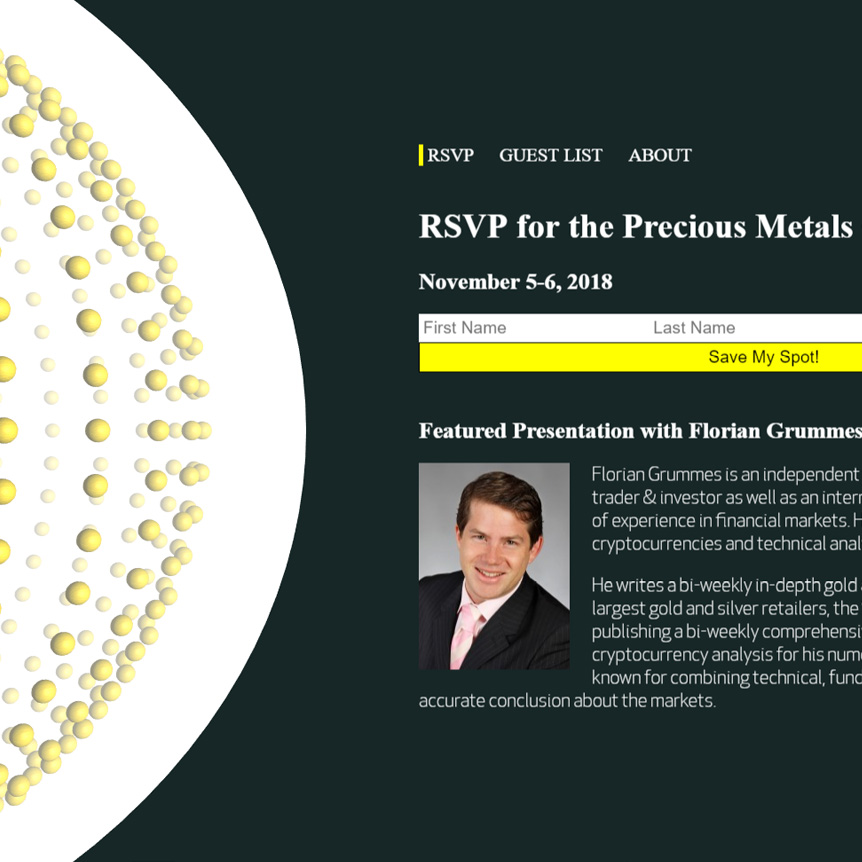
What I’ve done on the side is, this is sphere geometry and these are all vertices, and I just took the geometry, and I created spheres for every index in that array, and I just map over this array of vertices, and I place a new sphere at the location of that old vertex.

So in that you can do some really cool effects where you create a larger shape from some smaller shapes, and that’s actually a design principle. If you look here, we have three spheres here, going. We have the largest sphere, we have the smaller spheres, and then we have the actual background sphere. When it comes to design, repeating shapes is a bit of a design principle there, but I thought it was cool because you have 3D depth, and then you have 2D right here. That’s pretty sweet.

(moves cursor back to the information at the right, highlights the different features)

Anyway, the functionality is when you sign up and you do that form, you are able to go to this About page, and then this bottom part shows up, which is an iframe and then, thank you for registering and then they tell you when it’s at.

So yeah, going to release this. It was just a little bit of a project at University, I did way back in the day. So I want to allow people to play around with the Three.js parts, and then you’ll have to look into the PHP, because it was tied to a database, so likely those users are not going to exist, but there’s going to be an API call where you are going to be able to hit that and then populate that database. I think I even made a UI where you are going to be able to click a button and then you will be able to see it getting populated.

So just go through the PHP files and check out the repo a little bit, and it’s just a good starting off point so you don’t have to do a bunch of work to create a bit of a landing page thing, with 3D elements, database functionality and PHP.

So cool guys, check that out. Alright. Bye now.
Categories
Our Freeware

Space Sound Continuum

Hey Guys,

Today I want to demo the second product that I ever made in Three.js.

This was a more in-depth project that was just about learning and just having some fun. This was way back in the day. I learned a lot about shaders. I call it the Space-Sound Continuum.

What  I have is a few songs, and I have Javascript using the web-audio API to analyze frequency. Let’s see if I can jump over really quickly for this code… if it will open the right folder here, yeah…

(highlights directory on left)

So this is the directory for the game and we have a lot of shaders here on the side, a stereo effect for virtual reality. It creates a left frame and a right frame and then using the two it creates depth in kind of an illusionary perception.

(chooses script from the directory)

So let’s see here for the script and look really quickly at this. I have five different frequency counts and they are averaged out and interpolated in real-time. That was pretty cool at the time.

(chooses skyboxes)

And then about skyboxes, I don’t know if you know about them very much, but essentially you have an original image. See, this is basically wrapped up into a cube and it’s seamless. So it looks like it goes on into infinity. That’s how they make video game spaces in the background.

I’ve done some work in my earthquake visualizer, the skybox in that is not actually perfect. I don’t really mind that so much. Maybe one day I’ll go back and edit it, but these are just personal projects to show you some cool stuff that you can do with Javascript.

(switches to Home screen)

So let’s jump over to the game. I hope that it works well with the screen recording software, (inaudible) but I know without it it’s very smooth. There was originally going to be an upload song functionality, but I got busy, so this doesn’t actually work here.

(selects first track)

But let’s just jump over to this, and you see you have your virtual reality option and you have your standard desktop/laptop with a keyboard. Let’s try it out.

(demo)

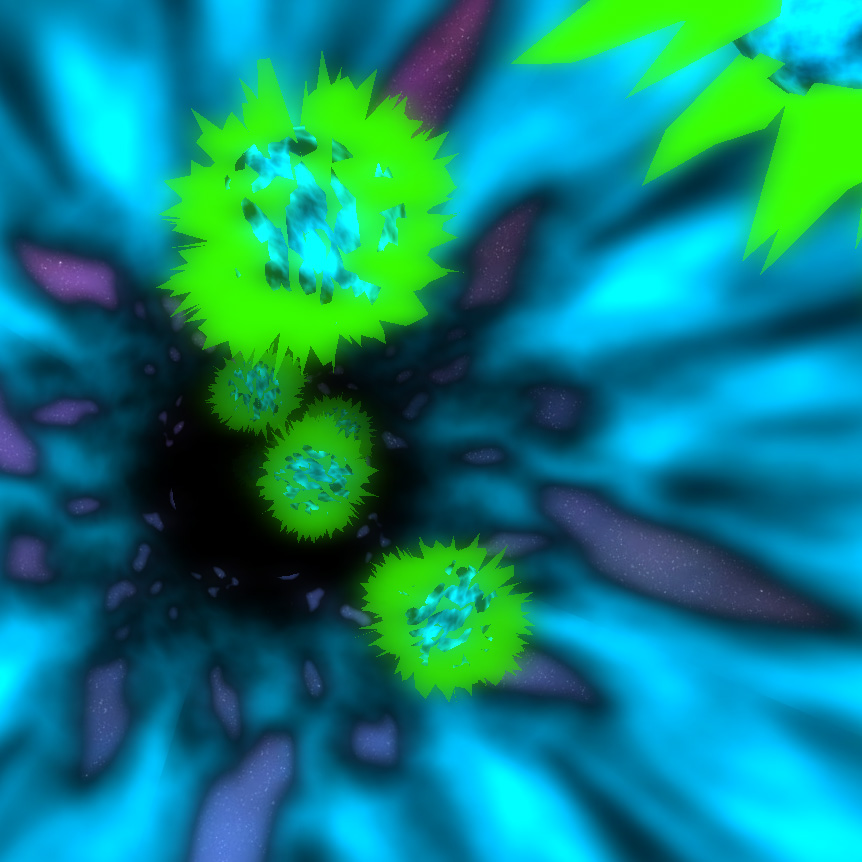
So you can see that…let me drop the sound quick here…you can see that the actual properties of the game are mapped in real-time to audio of different frequencies. So we have lots of shaders doing fluorescence and anastrophic filtering and glow passes and all sorts of things here, and I use an octree for collision detection.

These little white spheres are actually health. So when you hit one of these spikey balls that use some custom shaders that I wrote, you end up getting knocked and your health goes down. Your health is actually illustrated through the light, so the more you get hit, the darker it gets and at a certain point if it’s too dark, you basically are Game Over and you get redirected, bounced back out to the Home page there, which is the song selector.

So let’s just play this for a little bit. You can always fast-forward in the video and check back in.

(plays game)

Ooof, ooof! So with the (inaudible) recording software, it actually kind-of ah, is a bit slower because there is a lot going on on this computer for that. But ah, as you can see there’s a bit of a flash, if I can snag…oh, so close!

There we go. Got one. That’s a little health. Bring it back. BOOM! Sounded, (inaudible) it back here. Hold-on! BOOM! Oh, I got this! I think I can beat this right now, actually.

(game running, music playing)

Boom! Alright, and now I’m just going to lose here, so you can see what happens. Ah, boom! I have really low health right now, look at this. Let me go out of this tunnel to show you how I do this. So you have your skybox, you have your tunnel, and then there’s some alpha mapping going on to do the transparencies. And then I just insert these balls at one end, and then when they get to a certain coordinate at the end, I just remove them from the scene.

So let’s go back in and kinda lose the game so you can see how it bounces back. GAME OVER guys. Game over.

(back to Home screen)

So I hope that was really cool. I’m going to make this public for freeware. So people can just have some fun with Three.js and learn a little bit about shaders and how you can do collision detection and things like that. I know that when you first start out it takes a long time to learn these things, but then once you have a couple of personal projects under your belt or just professional projects as well, the mastery really steps it up.

So I will likely have to edit these songs, unfortunately, guys. I’ll probably have to use some sort of copyright-free music. It may not be that great. It’ll take me some time to change that out and find that because I can’t actually release this with the songs included for copyright issues. I’ll be doing that and then putting a link to this. Later on, I’ll go back to the Facebook video and add in a link.

So enjoy guys! Bye.

Categories
Our Freeware

Collision Detection

Hi Everyone, 

Today I am introducing p5.js. 

For those Javascript developers who don’t know p5.js, it’s basically an abstraction library for Canvas. 

(starts drawing lines on grey space.)

If you do any basic 2D Canvas interactions, p5.js makes it very simple. 

(points at script, then scribbles on grey space.)

Look at this here, it’s like, ten lines or so, and you have drawing going on. Doing this in a normal canvas without this abstraction is not fun. It just takes a long time. 

(selects Particle System, a starburst pattern repeats itself)

So let’s just check out a couple of examples really quickly. Let’s check out this particle system here. Cool! That’s cool. 

I learned about p5.js because it is based on processing. Processing is originally in Java, and it allows you to play around with Java essentially. It incorporates a really easy visualization layer. I learned about it back in the day at the Academy of Art, when we had a section on generative art. 

If I ever retire completely, I will probably become some sort of generative artist using code. 

(selects Multiple Particle Systems, the Particle System pattern repeats itself)

So let’s see here. Multiple Particle Systems! So that’s kind of neat. There is a lot of different things you can do. Imagine you put a background image off of say, your webcam in here and then you can add things and then you click a button and it saves it out. Or something like that, you know. There are a lot of possibilities. 

(selects the Mandelbrot Set, a basic fractal appears)

Pretty cool. Pretty cool.

(selects Snowflakes, a red background appears with white cascading snowflake pattern)

 We have snowflakes? Like, that’s awesome. That’s really great. I really enjoy the artistic aspect of coding. You know, it’s really nice when you can just create without having to worry about certain specs or the budget. 

(switches back to directory page, then brings up code for Collision detection in another window.)

Anyways, to get you started with p5.js, a long time ago I built a collision detection library here. Just basic ball bouncing. You know there’s the Hello World for most coding programs when you are learning. This ball bouncing is basically to me the Hello World of animation. 

So, a hundred lines, it’s es5. It’s old, but you’ll learn it. 

(plays Ball Bounce Script)

And in it, if we go over here for the ball bounce script…Let’s check it out. This p5.js has fantastic FPS. I actually tried to import this over to C++, so I could end up learning web assembly and I found out I really enjoy Javascript more so than C++, because in doing so I really hit less performance. 

I think it was either using vectors in C++ under the hood or just not performing in the way that I was trying to convert it, or the actual 2D rendering library was not optimized. There was actually a bug in that, in Github, issues we fixed. 

So yeah, this is the script. You can check it out. If you just want to learn a bit about p5.js, it’s a good little intro, and I have a two-step, two-stage on this, so I originally learned this and I thought alright, let me take up the complexity a little bit, and I will demo that video next video after this.

So check it out, p5.js. Generative art. Have a good day everybody. Bye.

Categories
Our Freeware

Connection Structure

Alright, This is my second stage video here, about p5.js. Originally, I had shown a video that was a simple ball bouncing script. You know, that’s kind of the Hello World of animation, as far as I’m concerned. If you missed video you can check it out on the company Facebook page or the website. This is about  p5.js here, so p5.js.org a 2D animation canvas library does some cool things makes it a lot faster for some simple canvas animations.

Now this was like I said, the second stage. I built this when I was working as the only developer for a company called Correlation One. Way back in the day I was working for Asham and Rasheed, both of them were just starting the company over there in New York and now it’s actually backed by Soft Bank and they’re changing the world.

So really amazing stuff.  I was inspired by the data science bit about it all. So I thought wow, it would be cool to create something where I could just take a screenshot with a plug-in and have a perfect background that’s generative. You know generative art here, data science style.

So in it, there are some different things you can do. If you hold down on the arrow key you reduce the overall count. So look, now there’s a lot less. If I go up I can really max it out. The interesting thing about this that I actually thought was clever in the implementation of this…this is 2D, but it looks a bit 3D because I’ve gone and done a bit of illusion work here with size and transparency. So if you see….

(unwanted window opens, he closes it out)

wow, hold on guys. Alright, so if you see it’s smaller, more transparent in the background you have the larger ones, and they only connect to the ones on the same plane, which is really an array.

So you have three different arrays, foreground, middle ground, background, typical art-style, but you can also change…

(changes color)

the color. So there are a couple of different presets that allow people to edit thighs differently in say Photoshop or Illustrator.

(cycling through effects)

So you take this as the base and you are able to use some cool effects later on. You can also remove the fill by going on the left arrow. The right arrow cycles through, the left arrow will cycle through in reverse but without fill. So you can see the triangles are not filled at all.

I had a really great time in doing this. It was really cool seeing the performance of p5.js., and this repo is available.

(changes screen to view code)

So if you want to check it out, you totally can. I would say, look at the ball bounce first. I had a lot of repos, but only a few are public. Very few are actually public, so you will be able to see both.

This is just a building off of the original one, it’s a good way to get creative in p5.js.

(highlights array)

You can see a little more things that I did with key code pressing and updating multi-dimensional arrays, a depth layer, and then then I, and this is drawing other layers, it’s broken out into a different function clause. This is ES5, this is a while ago, but it’s fairly straight forward and pretty clean to understand, I believe.

So check it out if you like p5.js and I hope this was helpful for you.

(switches to Stack Overflow website)

I’ve also answered some questions on stack overflow about p5.js, so you many in poking around online find me on there as well.

(switches back to generative art page)

I hope this was helpful guys, and once again, if you have any very cool animation projects or just Javascript orientated work I would love to come onto the project and see how I could help deliver those fantastic results for you.

Take care and be well. Bye.